Aysa Trade

راهنمای کامل آیسا ترید — ابزار حرفه‌ای مدیریت معاملات در متاتریدر ۵User guide — Professional trade management for MetaTrader 5

v2.4.1 · aysatrade.ir

فهرستContents

  1. نصب و راه‌اندازیInstallation
  2. پنل و صفحه TradeThe panel and the Trade page
  3. ابزار پوزیشن روی نمودار (Lines)Position tool on the chart (Lines)
  4. ورود با کشیدن ماوس (Draw trade)Draw a trade
  5. صفحه CloseClose page
  6. صفحه Trail (تریلینگ استاپ)Trail page (trailing stop)
  7. صفحه BE/LimBE/Lim page
  8. صفحه SetupSetup page
  9. صفحه Parts (بستن جزئی)Parts page (partial close)
  10. صفحه TimeTime page
  11. صفحه Prop (محافظ پراپ فرم)Prop page (prop-firm guard)
  12. اتوپایلت اضطراری (Pilot)Emergency Auto Pilot (Pilot)
  13. صفحه Info و هشدار اخبارInfo page and news warning
  14. رنگ‌ها و تم CustomColors and the Custom theme
  15. نکات مهمImportant notes

آیسا تریدAysa TradeAysa Tradeآیسا ترید

ابزار حرفه‌ای مدیریت معاملات در متاتریدر ۵Professional trade management for MetaTrader 5

محاسبه ریسک، ورود با یک کشیدن ماوس، مدیریت خودکار معامله، محافظ پراپ فرم و اتوپایلت اضطراری؛ همه در یک پنل جمع‌وجور روی نمودار.Risk sizing, one-drag order entry, automatic trade management, a prop-firm guard and an emergency auto pilot, all in one compact panel on the chart.

دانلود اکسپرت v2.4.1Download the EA (v2.4.1)راهنمای PDFPDF guide

نسخه آزمایشی رایگان، قابل استفاده تا پایان دسامبر ۲۰۲۶ · فقط متاتریدر ۵ · 407 KBFree trial, works until the end of December 2026 · MetaTrader 5 only · 407 KB

مطالعه راهنماRead the guide
MetaTrader 5 · MQL5v2.4.1R = initial SL distanceFA / EN

امکانات اصلیWhat it does

هر چیزی که برای ورود، مدیریت و محافظت از معامله لازم دارید.Everything you need to enter, manage and protect a trade.

01 · risk

محاسبه حجم از روی ریسکRisk-based lot size

درصد بالانس، اکوییتی، مارجین آزاد یا مبلغ ثابت؛ حجم از فاصله SL حساب می‌شود.Percent of balance, equity, free margin or a fixed amount; the lot follows the SL distance.

02 · lines

ابزار پوزیشن روی نمودارPosition tool on the chart

ورود، SL و TP را با ماوس بکشید؛ پول، درصد و نسبت ریسک به ریوارد زنده نمایش داده می‌شود.Drag entry, SL and TP; money, percent and reward:risk update live.

03 · draw

ورود با کشیدن ماوسDraw a trade

از نقطه ورود تا SL بکشید و رها کنید؛ حجم و TP خودکار محاسبه می‌شود.Drag from entry to SL and release; lot and TP are calculated for you.

04 · manage

مدیریت خودکارAutomatic management

۷ نوع تریلینگ، بریک‌ایون با کمیسیون و سوآپ، بستن جزئی، OCO و سفارش مجازی.7 trailing types, breakeven incl. commission and swap, partial closes, OCO and virtual orders.

05 · prop

محافظ پراپ فرمProp-firm guard

حد ضرر روزانه و کلی، ریسک باز همزمان، حداقل زمان نگهداری و قفل خودکار معامله.Daily and max loss, simultaneous open risk, minimum holding time and automatic lock-out.

06 · pilot

اتوپایلت اضطراریEmergency auto pilot

یک دکمه برای بریک‌ایون، تریلینگ، قفل سود، بستن زمانی و اعلان به موبایل.One button for breakeven, trailing, profit lock, time exit and phone alerts.

07 · news

هشدار اخبارNews warning

نوار قرمز با شمارش معکوس پیش از اخبار مهم تقویم متاتریدر.A red countdown bar before important events of the MetaTrader calendar.

08 · lang

دو زبانه و قابل شخصی‌سازیBilingual and customizable

فارسی و انگلیسی، تم تیره، روشن، رنگی و رنگ‌های دلخواه.Persian and English, dark, light, color and fully custom themes.

راهنمای کاملFull guide

بخش به بخش، همراه با تصویر هر صفحه از پنل.Section by section, with a picture of every panel page.

01نصب و راه‌اندازیInstallation

  1. فایل AysaTrade.ex5 را از دکمه «دانلود اکسپرت» در aysatrade.ir بگیرید و در پوشه MQL5\Experts متاتریدر کپی کنید (منوی File › Open Data Folder).
  2. در پنجره Navigator روی Expert Advisors راست‌کلیک و Refresh کنید.
  3. AysaTrade را روی نمودار نماد دلخواه بکشید. در زبانه Common گزینه Allow Algo Trading را روشن کنید.
  4. دکمه Algo Trading نوار ابزار متاتریدر هم باید روشن باشد.

تنظیمات اصلی (زبان توضیحات، تم، مجیک‌نامبر، کلیدهای میانبر و مقادیر پیش‌فرض) در زبانه Inputs هستند. بیشتر تنظیمات بعداً از خود پنل تغییر می‌کنند و ذخیره می‌شوند.

  1. Download AysaTrade.ex5 with the "Download the EA" button on aysatrade.ir and copy it into the MQL5\Experts folder of MetaTrader (File › Open Data Folder).
  2. In the Navigator, right-click Expert Advisors and choose Refresh.
  3. Drag AysaTrade onto a chart. On the Common tab enable Allow Algo Trading.
  4. The Algo Trading button in the MetaTrader toolbar must be on as well.

The main settings (help language, theme, magic number, hotkeys and defaults) are on the Inputs tab. Most settings are later changed on the panel itself and are remembered.

02پنل و صفحه TradeThe panel and the Trade page

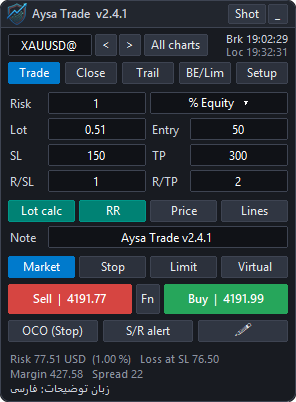
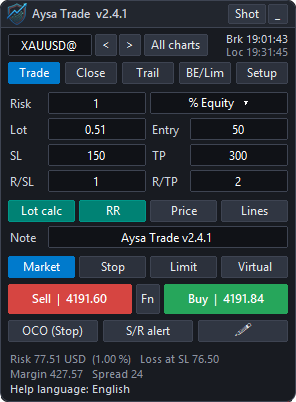
هدر: لوگو و نسخه، دکمه Shot برای اسکرین‌شات و _ برای کوچک کردن. پنل را با کشیدن هدر جابه‌جا کنید.

ردیف نماد: نام نماد (تایپ و Enter برای تغییر)، نماد قبلی و بعدی، All charts برای تغییر هم‌زمان همه نمودارها، ساعت بروکر (Brk) و ساعت محلی (Loc).

تب‌ها: Trade، Close، Trail، BE/Lim و Setup. صفحه‌های Parts، Time، Prop، Pilot، Info و Colors از Setup باز می‌شوند.

کادرهای صفحه Trade

  • Risk و روش آن: مبلغ یا درصد بالانس، اکوییتی، مارجین آزاد، مبنای دلخواه یا بالانس ابتدای روز/هفته/ماه.
  • Lot: با روشن بودن Lot calc از روی ریسک و فاصله SL محاسبه می‌شود.
  • Entry: فاصله سفارش معلق از قیمت (پوینت). SL و TP به پوینت؛ با دکمه Price به قیمت تبدیل می‌شوند.
  • R/SL و R/TP: با روشن بودن RR، حد سود از نسبت این دو ساخته می‌شود.
  • Note: کامنت سفارش؛ پیش‌فرض نام و نسخه اکسپرت.
  • Market / Stop / Limit و Virtual (سفارش معلقی که داخل اکسپرت می‌ماند).
  • Sell / Buy: اگر SL بالای ورود باشد فقط Sell فعال است و برعکس.
  • OCO (Stop): دو سفارش Stop خرید و فروش؛ با فعال شدن یکی، دیگری حذف می‌شود. SL و TP هر دو از کادرهای SL و TP و فاصله ورود از Entry گرفته می‌شود.
  • S/R alert: هشدار شکست خط‌هایی که خودتان کشیده‌اید (با بسته شدن کندل).
  • آیکون مداد: ورود با کشیدن ماوس (پایین‌تر توضیح داده شده).

وقتی روی نماد معامله یا سفارش باز وجود دارد، دکمه‌های مدیریتی خودکار ظاهر می‌شوند: بستن فروش‌ها/همه/خریدها، حذف سفارش‌ها، بستن درصدی، Breakeven و + Commission & Swap و دکمه Emergency Auto Pilot.

پایین پنل: ریسک به پول، ضرر در SL، مارجین، اسپرد و مانده حد پراپ.

Header: logo and version, Shot for a screenshot and _ to minimize. Drag the header to move the panel.

Symbol row: symbol name (type and press Enter to change), previous / next symbol, All charts to change every chart at once, broker time (Brk) and local time (Loc).

Tabs: Trade, Close, Trail, BE/Lim and Setup. Parts, Time, Prop, Pilot, Info and Colors open from Setup.

Trade page fields

  • Risk and its method: fixed money or percent of balance, equity, free margin, a custom base or the balance at the start of the day/week/month.
  • Lot: calculated from the risk and the SL distance when Lot calc is on.
  • Entry: distance of a pending order from the price (points). SL and TP in points; Price switches them to prices.
  • R/SL and R/TP: with RR on, the TP is built from this ratio.
  • Note: order comment; the default is the EA name and version.
  • Market / Stop / Limit and Virtual (a pending order kept inside the EA).
  • Sell / Buy: if the SL is above the entry only Sell is enabled, and vice versa.
  • OCO (Stop): a buy stop and a sell stop; when one is filled the other is deleted. Both use the SL and TP boxes, and the Entry box for the distance.
  • S/R alert: alert when a candle closes across lines you drew yourself.
  • The pencil icon: draw a trade with the mouse (see below).

When the symbol has an open trade or a pending order, the management buttons appear automatically: close sells / all / buys, delete orders, close a percentage, Breakeven, + Commission & Swap and the Emergency Auto Pilot button.

Footer: risk in money, loss at SL, margin, spread and the remaining prop-firm limit.

The panel and the Trade pageThe panel and the Trade page
پنل و صفحه TradeThe panel and the Trade page

03ابزار پوزیشن روی نمودار (Lines)Position tool on the chart (Lines)

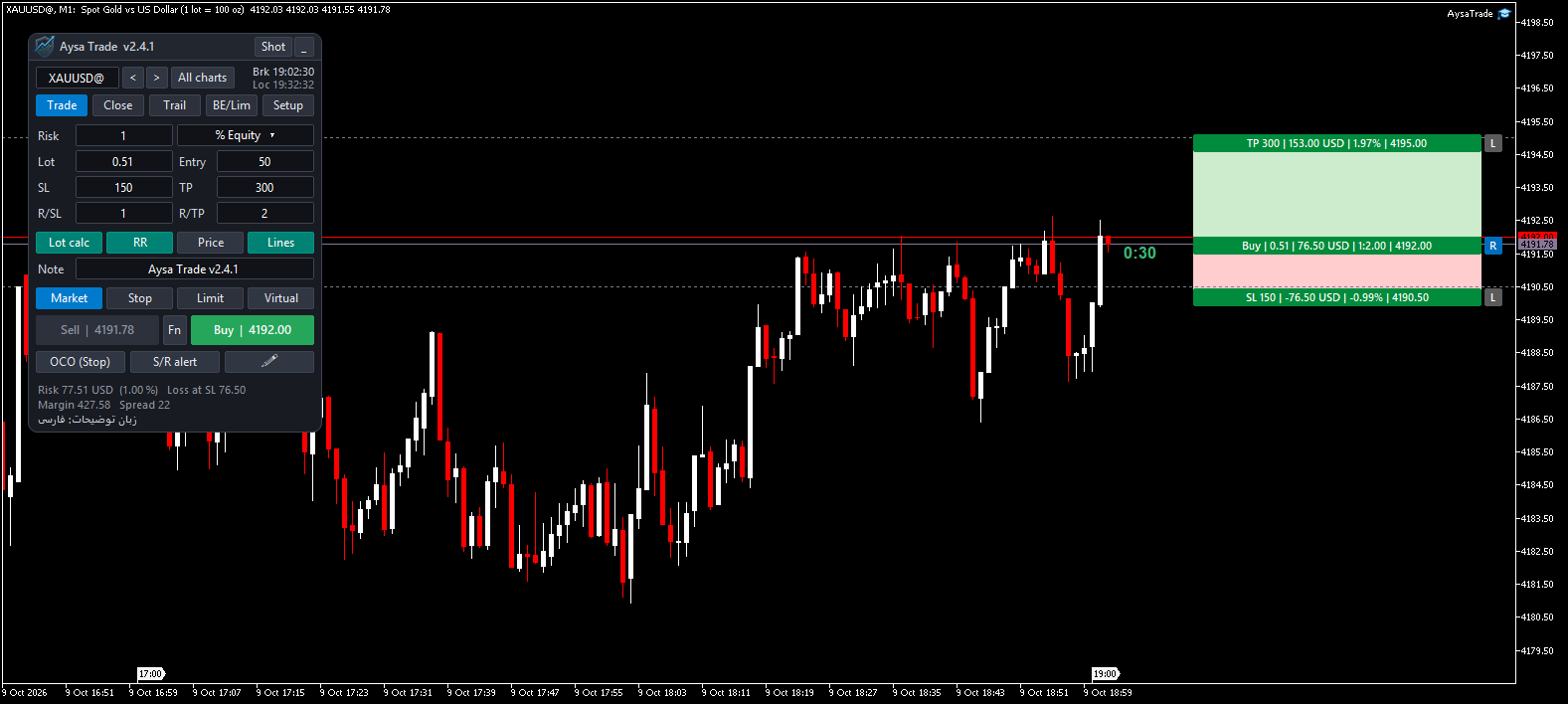
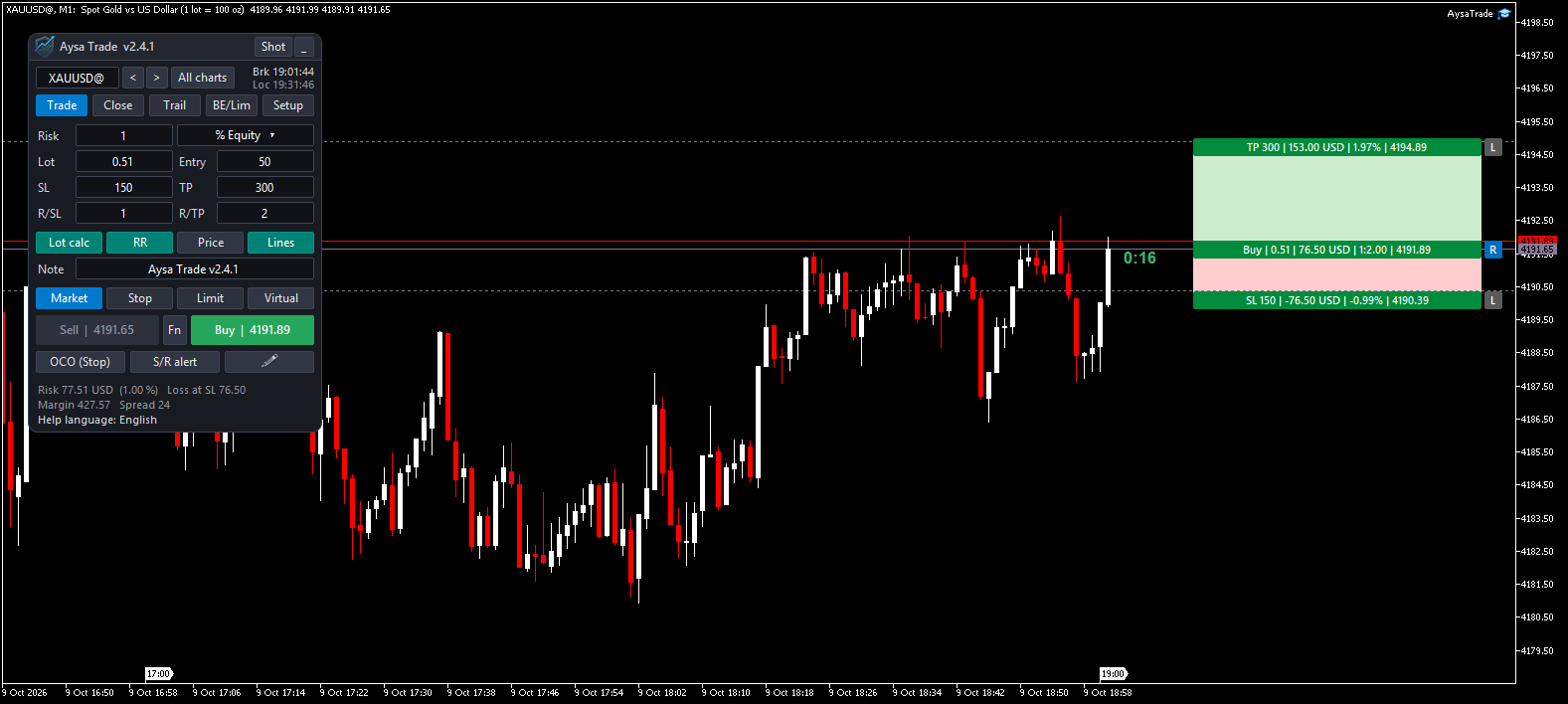
با روشن کردن Lines، ابزار پوزیشن روی قیمت فعلی ساخته می‌شود: SL از کادر SL و TP از RR. هر کادر را می‌توان با ماوس کشید:

  • بالا و پایین قیمت را تغییر می‌دهد، چپ و راست فقط جای کادر را. اولین حرکت واضح ماوس جهت را قفل می‌کند تا قیمت به‌اشتباه تغییر نکند.
  • کشیدن نقطه ورود از قیمت فعلی، سفارش را به Stop یا Limit تبدیل می‌کند؛ نزدیک قیمت فعلی به Market می‌چسبد (مگنت).
  • دکمه R کنار ورود، Buy و Sell را معکوس می‌کند. دکمه‌های L قفل SL و TP هستند: در برابر تغییرات خودکار ثابت می‌مانند ولی با ماوس جابه‌جا می‌شوند.
  • خط‌های نقطه‌چین کم‌رنگ پشت کادرها، سطح‌ها را روی کندل‌ها نشان می‌دهند. بخشی از کادر که زیر داشبورد یا بیرون از نمودار باشد پنهان می‌شود.

معاملات باز و سفارش‌های معلق

هر معامله و سفارش همین شکل را دارد. ورود معامله باز ثابت است؛ SL و TP آن با ماوس تغییر می‌کنند و اطلاعات حین کشیدن به‌روز می‌شود. قیمت‌های سفارش معلق فقط از منوی ... › Edit تغییر می‌کنند. کلیک روی نوار ورود SL و TP را پنهان یا نمایان می‌کند. منوی ... شامل Delete، Hide SL TP، OCO، Expiration، Edit، Trailing، Break Even، Partial Close، Color و Comment است.

اگر تریلینگ یا بریک‌ایون فعال باشد، برچسب آبی «Trail start» و نارنجی «Breakeven at» روی معامله نمایش داده می‌شود و با ماوس (فقط بین ورود و TP) قابل جابه‌جایی است؛ بعد از فعال شدن حذف می‌شود.

Turning on Lines builds the position tool at the current price: SL from the SL box, TP from RR. Every box can be dragged:

  • Up/down changes the price, left/right only moves the box. The first clear mouse movement locks the axis so a price never changes by accident.
  • Dragging the entry away from the price turns the order into a Stop or Limit; near the current price it snaps back to Market.
  • The R button reverses Buy and Sell. The L buttons lock SL and TP against automatic changes; the mouse can still move them.
  • Faint dotted guide lines show the levels across the candles. The part of a box under the dashboard or outside the chart is hidden.

Open trades and pending orders

Every trade and order uses the same tool. The entry of an open trade is fixed; its SL and TP can be dragged and the figures update while you drag. Pending-order prices are changed only from ... › Edit. Clicking the entry bar hides or shows SL and TP. The ... menu offers Delete, Hide SL TP, OCO, Expiration, Edit, Trailing, Break Even, Partial Close, Color and Comment.

When trailing or breakeven is active, a blue "Trail start" and an orange "Breakeven at" label appear on the trade; drag them (between entry and TP) to change them. They disappear once the function has started.

Position tool on the chart (Lines)Position tool on the chart (Lines)
ابزار پوزیشن روی نمودار (Lines)Position tool on the chart (Lines)

04ورود با کشیدن ماوس (Draw trade)Draw a trade

آیکون مداد را بزنید (یا Ctrl+Shift+Q)، روی نمودار از نقطه ورود تا SL بکشید و رها کنید. حین کشیدن جهت، فاصله SL، حجم و TP نمایش داده می‌شود. حجم از ریسک و TP از RR محاسبه می‌شود. اگر شروع کشیدن نزدیک قیمت فعلی باشد سفارش Market است، وگرنه Stop یا Limit. خط تا فعال شدن یا حذف سفارش روی نمودار می‌ماند.

Click the pencil icon (or Ctrl+Shift+Q), drag on the chart from the entry to the SL and release. While dragging you see the direction, SL distance, lot and TP. The lot comes from the risk and the TP from RR. Starting near the current price gives a Market order; otherwise a Stop or Limit. The line stays until the order is filled or deleted.

05صفحه CloseClose page

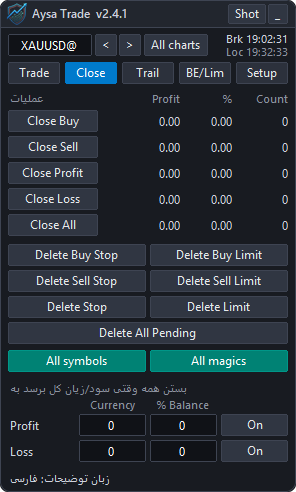
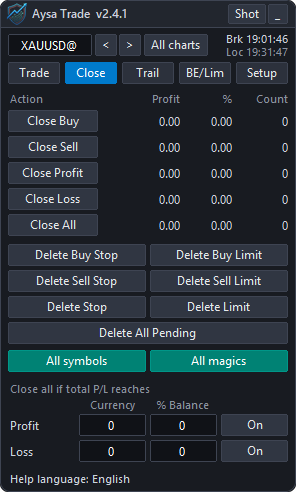
بستن خریدها، فروش‌ها، معاملات سودده، زیان‌ده یا همه، همراه با سود/زیان، درصد و تعداد هر گروه. حذف سفارش‌های معلق بر اساس نوع. All symbols و All magics دامنه را تعیین می‌کنند. پایین صفحه: بستن خودکار همه وقتی سود یا زیان کل به مبلغ یا درصد مشخص برسد.

Close buys, sells, profitable, losing or all positions, with the profit, percent and count of each group. Delete pending orders by type. All symbols and All magics set the scope. At the bottom: close everything automatically when the total profit or loss reaches an amount or a percent.

Close pageClose page
صفحه CloseClose page

06صفحه Trail (تریلینگ استاپ)Trail page (trailing stop)

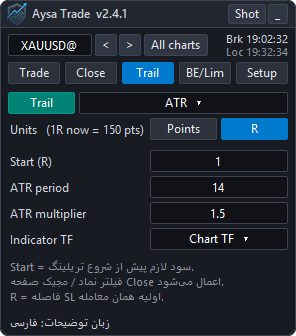
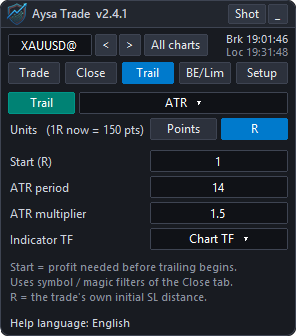
هفت نوع تریلینگ: Pips، Fractals، Moving Average، Parabolic SAR، ATR، Partial close و High-Low bars. فقط پارامترهای لازم برای نوع انتخابی نمایش داده می‌شوند. واحد می‌تواند Points یا R باشد؛ R یعنی فاصله SL اولیه همان معامله (مثلاً Start = 1.5R یعنی وقتی سود به یک و نیم برابر ریسک رسید).

Seven trailing types: Pips, Fractals, Moving Average, Parabolic SAR, ATR, Partial close and High-Low bars. Only the parameters the selected type uses are shown. The unit can be Points or R; R is the initial SL distance of that trade (Start = 1.5R means when the profit reaches 1.5 times the risk).

Trail page (trailing stop)Trail page (trailing stop)
صفحه Trail (تریلینگ استاپ)Trail page (trailing stop)

07صفحه BE/LimBE/Lim page

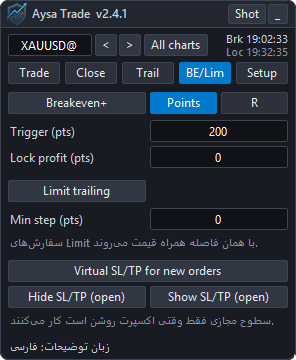
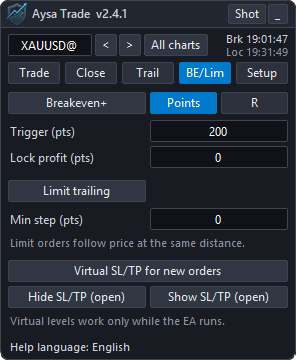
Breakeven+: بعد از سود مشخص، SL به ورود (به‌علاوه سود قفل‌شده) می‌رود. با + Commission & Swap کمیسیون رفت‌وبرگشت و سوآپ منفی هم پوشش داده می‌شود. اسپرد لازم نیست، چون قیمت ورود در متاتریدر اسپرد را در خود دارد. Limit trailing: سفارش‌های Limit با همان فاصله همراه قیمت حرکت می‌کنند. Virtual SL/TP: حد ضرر و سود به بروکر فرستاده نمی‌شود.

Breakeven+: after the given profit the SL moves to the entry (plus the locked profit). With + Commission & Swap the round-trip commission and negative swap are covered too. The spread is not needed because the MetaTrader entry price already contains it. Limit trailing: limit orders follow the price at the same distance. Virtual SL/TP: stops are not sent to the broker.

BE/Lim pageBE/Lim page
صفحه BE/LimBE/Lim page

08صفحه SetupSetup page

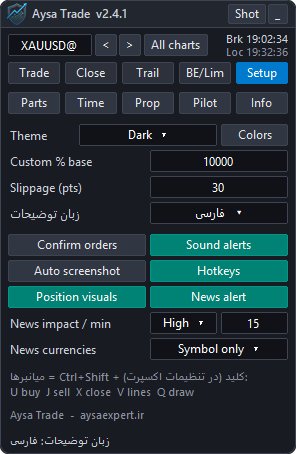
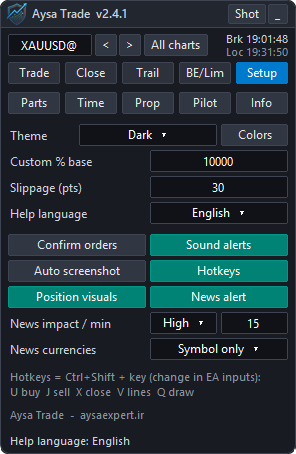
دکمه‌های Parts، Time، Prop، Pilot و Info؛ انتخاب تم و دکمه Colors؛ مبنای % Custom؛ لغزش مجاز؛ زبان توضیحات (Help language): زبان راهنماها، tooltipها و پیام‌ها را فارسی یا انگلیسی می‌کند و بلافاصله اعمال می‌شود (نام دکمه‌های پنل انگلیسی می‌مانند)؛ تأیید سفارش، صدا، اسکرین‌شات خودکار، کلیدهای میانبر، نمایش ابزار معاملات و هشدار اخبار (اهمیت، دقیقه قبل از خبر، ارزها).

کلیدکار
Ctrl+Shift+Uخرید
Ctrl+Shift+Jفروش
Ctrl+Shift+Xبستن همه
Ctrl+Shift+Vروشن/خاموش Lines
Ctrl+Shift+QDraw trade

این حروف با میانبرهای خود متاتریدر تداخل ندارند و در Inputs قابل تغییرند.

Buttons for Parts, Time, Prop, Pilot and Info; theme and the Colors button; the % Custom base; slippage; Help language: switches the help texts, tooltips and messages between English and Persian at once (the panel buttons stay in English); order confirmation, sounds, automatic screenshots, hotkeys, trade visuals and the news warning (importance, minutes before, currencies).

KeyAction
Ctrl+Shift+UBuy
Ctrl+Shift+JSell
Ctrl+Shift+XClose all
Ctrl+Shift+VLines on/off
Ctrl+Shift+QDraw trade

These letters do not clash with MetaTrader's own shortcuts and can be changed in the Inputs.

Setup pageSetup page
صفحه SetupSetup page

09صفحه Parts (بستن جزئی)Parts page (partial close)

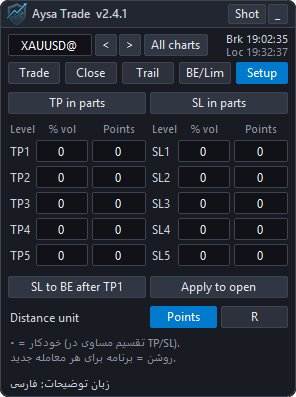
تا پنج سطح TP و پنج سطح SL با درصد حجم و فاصله (پوینت یا R؛ صفر = تقسیم مساوی). با SL to BE after TP1 بعد از اولین سطح سود، استاپ به سربه‌سر می‌رود. Apply to open برنامه را روی معاملات باز اعمال می‌کند.

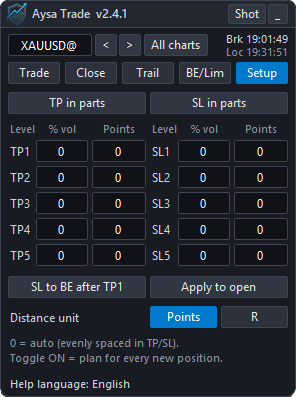
Up to five TP and five SL levels with a volume percent and a distance (points or R; zero = evenly spaced). SL to BE after TP1 moves the stop to breakeven after the first profit level. Apply to open applies the plan to open trades.

Parts page (partial close)Parts page (partial close)
صفحه Parts (بستن جزئی)Parts page (partial close)

10صفحه TimeTime page

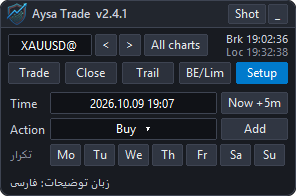
زمان‌بندی خرید، فروش، بستن خریدها/فروش‌ها/همه، حذف سفارش‌ها یا بستن متاتریدر در ساعت مشخص سرور، با تکرار هفتگی.

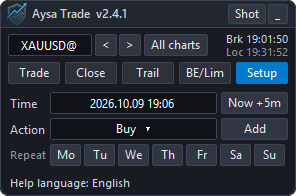
Schedule a buy, sell, close buys / sells / all, delete orders or close MetaTrader at a server time, with weekly repeat.

Time pageTime page
صفحه TimeTime page

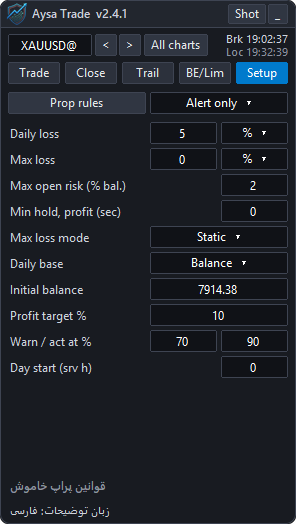
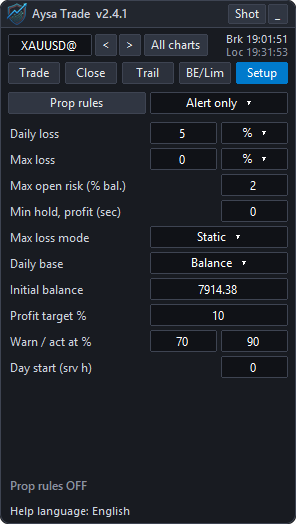
11صفحه Prop (محافظ پراپ فرم)Prop page (prop-firm guard)

  • Daily loss و Max loss به درصد یا مبلغ؛ حد کلی Static یا Trailing؛ مبنای روز بالانس یا بیشترین بالانس/اکوییتی.
  • Max open risk: جمع ضرر همه معاملات و سفارش‌ها در صورت خوردن SL؛ سفارشی که از این حد عبور کند ثبت نمی‌شود.
  • Min hold, profit: معامله سودده زودتر از این چند ثانیه بسته نمی‌شود و روی کادر معامله تایمر دیده می‌شود.
  • هشدار و اقدام در درصد مشخص از حد؛ اقدام: بستن همه و قفل معامله تا روز بعد، یا فقط هشدار.
  • وضعیت زنده: مبنای روز، کف روزانه، مانده، ریسک باز، هدف سود و پیشرفت.
  • Daily loss and Max loss in percent or money; the max limit can be Static or Trailing; the day base is the balance or the higher of balance and equity.
  • Max open risk: total loss of all trades and orders if every SL is hit; an order that exceeds it is blocked.
  • Min hold, profit: a profitable trade is not closed before this many seconds; a timer shows on the trade box.
  • Warning and action at a percent of the limit; the action closes everything and blocks trading until the next day, or only alerts.
  • Live status: day base, daily floor, remaining room, open risk, profit target and progress.
Prop page (prop-firm guard)Prop page (prop-firm guard)
صفحه Prop (محافظ پراپ فرم)Prop page (prop-firm guard)

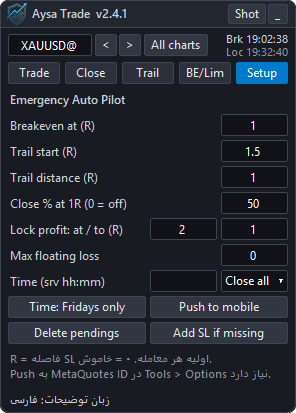
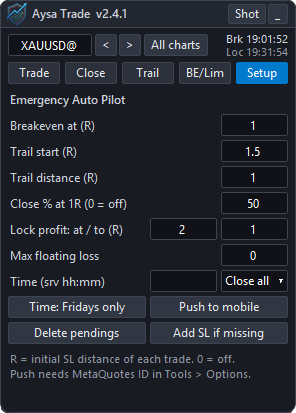
12اتوپایلت اضطراری (Pilot)Emergency Auto Pilot (Pilot)

برای وقتی که نمی‌توانید مراقب معامله باشید. با یک دکمه برای همه معاملات نماد: بستن جزئی در 1R، بریک‌ایون، تریلینگ (برحسب R)، قفل سود، حد ضرر شناور کل، اقدام زمانی (بستن همه یا سربه‌سر، اختیاری فقط جمعه‌ها)، حذف سفارش‌های معلق، گذاشتن SL برای معامله بدون SL و ارسال رویدادها به موبایل.

For when you cannot watch the trade. One button for every trade of the symbol: partial close at 1R, breakeven, trailing (in R), profit lock, a floating-loss cap, a time action (close all or breakeven, optionally Fridays only), deleting pending orders, adding an SL to trades without one and sending events to your phone.

Emergency Auto Pilot (Pilot)Emergency Auto Pilot (Pilot)
اتوپایلت اضطراری (Pilot)Emergency Auto Pilot (Pilot)

13صفحه Info و هشدار اخبارInfo page and news warning

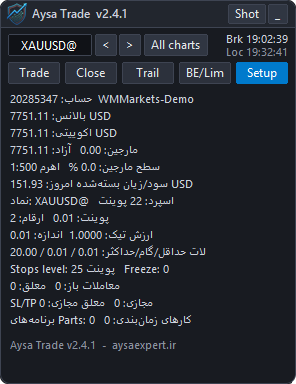
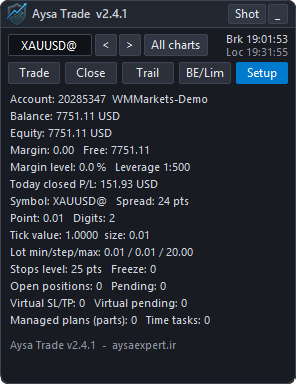
Info: حساب، بالانس، اکوییتی، مارجین، سود امروز، مشخصات نماد و تعداد معاملات. هشدار اخبار: پیش از خبرهای مهم تقویم متاتریدر، نوار قرمز با نام خبر و شمارش معکوس پایین داشبورد نمایش داده می‌شود.

Info: account, balance, equity, margin, today's result, symbol specification and trade counts. News warning: before important events of the MetaTrader calendar a red bar with the event name and a countdown appears at the bottom of the dashboard.

Info page and news warningInfo page and news warning
صفحه Info و هشدار اخبارInfo page and news warning

14رنگ‌ها و تم CustomColors and the Custom theme

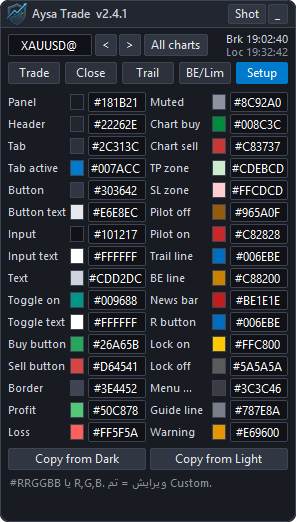
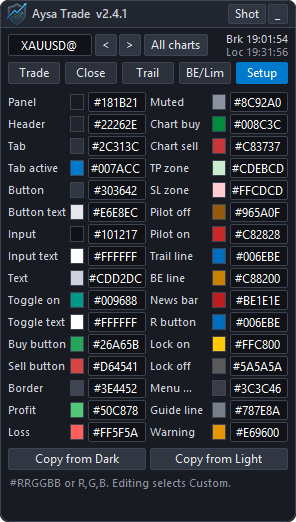
همه رنگ‌ها، از پنل و دکمه‌ها تا ابزارهای روی نمودار، خط‌های تریلینگ و نوار اخبار، به‌صورت #RRGGBB یا R,G,B قابل تغییرند. با تغییر هر رنگ تم روی Custom می‌رود.

Every color, from the panel and buttons to the chart tools, trailing lines and the news bar, can be set as #RRGGBB or R,G,B. Editing any color switches the theme to Custom.

Colors and the Custom themeColors and the Custom theme
رنگ‌ها و تم CustomColors and the Custom theme

15نکات مهمImportant notes

  • سفارش مجازی، SL/TP مجازی و اتوپایلت فقط وقتی متاتریدر و اکسپرت روشن هستند کار می‌کنند.
  • زمان‌ها به وقت سرور بروکر هستند؛ فاصله‌ها به پوینت یا R.
  • همیشه ابتدا روی حساب دمو امتحان کنید.
  • Virtual orders, virtual SL/TP and the auto pilot work only while MetaTrader and the EA are running.
  • Times are broker server time; distances are points or R.
  • Always test on a demo account first.